🎮 COPG - Ultimate Device Spoofer for Android Games & Apps





The most advanced device spoofer for Android gaming - bypass restrictions and play any game on any device!
🌟 COPG - Ultimate Device Spoofer for Games & Apps 🌟
Unlock the full potential of your games and apps with COPG! Spoof your device to enjoy premium features, max performance, and exclusive benefits. 🚀
🎮 Maximize Your Gaming Experience
- Call of Duty Mobile: 120 FPS (BR/MT)
- PUBG/BGMI: 120 FPS + Haptic Feedback
- Delta Force: 120 FPS/HD Graphics
- Mobile Legends: Ultra 120 FPS
- Freefire / Freefire max 120 FPS
- +60 games supported!
📱 Exclusive App Enhancements
Google Photos: Unlimited backup + AI generator
TikTok: Stream in stunning 1080p
🔧 Flexible & Future-Proof
Add new devices or games anytime
Beautiful WebUI to manage your spoofed apps
💡 Why Choose COPG?
Transform your device into a powerhouse for gaming and apps. Easy to use, fully customizable, and packed with features!
🛠️ Installation Made Simple
📋 Requirements
- Rooted Android device (9.0+)
- One of these root solutions:
with Zygisk Next/Rezygisk/NeoZygisk
with Zygisk Next/Rezygisk/NeoZygisk
with Zygisk Next/Rezygisk/NeoZygisk
📃 Note
- Standard/Native Zygisk isn't supported because its not safe.
- WebUI-X is recommended.
Download Module
[!TIP]
- You can download the module from:
- Or from Releases section.

⚙️ Installation Steps
- Download the latest
COPG.zipfrom Releases - Install via your root manager:
- Magisk: Modules → Install from storage → Select ZIP
- KernelSU: Modules → Install → Select ZIP
- APatch: Modules → Install → Select ZIP
- Reboot your device
- Verify installation in your root manager (look for "✨ COPG spoof ✨")
Customizing Spoof Profiles
Edit /data/adb/modules/COPG/config.json with this format:
{
  "PACKAGES_REDMAGIC9": [
    "com.mobilelegends.mi",
    "com.supercell.brawlstars"
  ],
  "PACKAGES_REDMAGIC9_DEVICE": {
    "BRAND": "ZTE",
    "MODEL": "NX769J",
    "FINGERPRINT": "ZTE/NX769J..."
  }
}
❓ FAQ
🤔 What does COPG stand for?
COPG stands for CO (from Call of Duty) and PG (from PUBG). The module was initially created for these two games. Although it now supports all games and applications, the original name was kept to preserve its historical background.📌 Will this get me banned?
While COPG is designed to be undetectable, I cannot guarantee safety. Use at your own risk.⚡ Does it affect performance?
Minimal impact! The optimized code adds only ~1ms to the launch time.🔧 How to access WebUI?
Use the WebUI X app:

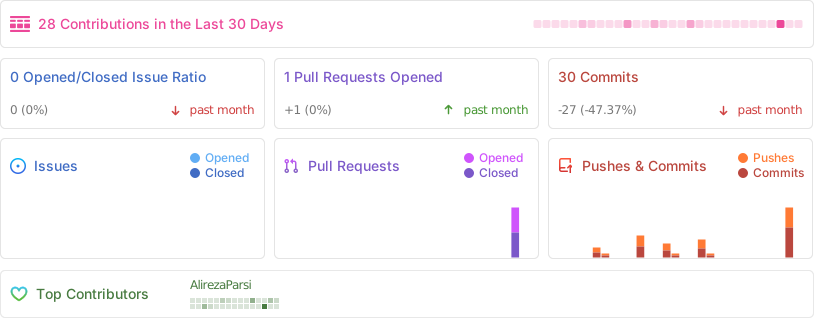
Activity
Star History
🖼 Screenshots
🌐 WebUI Interface

Settings Panel |

Add new App/game |

Device Profiles |

Game list |
🎮 Game Examples




Made with ❤️ by Alireza Parsi | © 2025 COPG Project